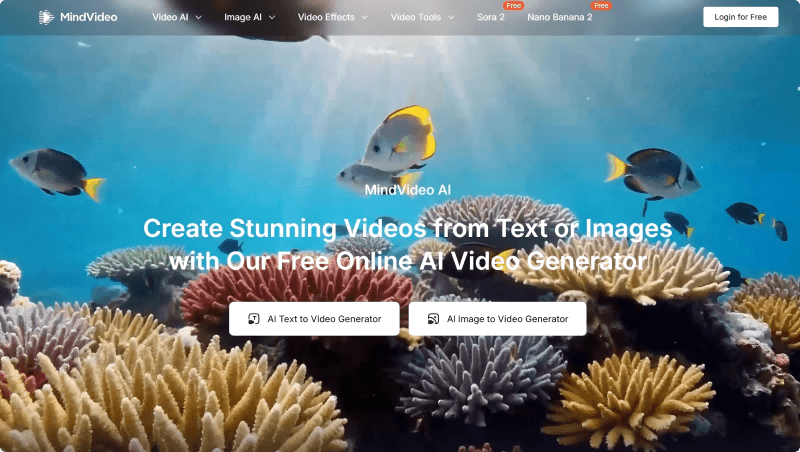
MindVideo AI – a free AI video generation tool supporting both image-to-video and text-to-video creation
What is MindVideo AI?
MindVideo AI is an advanced free online AI video generation tool that supports both text-to-video and image-to-video functionality. Users can input text descriptions or upload static images to generate high-quality videos within seconds. Features include a wide range of AI video effects, such as AI-generated kissing, hugging, and inflation, integrating top AI models like Kling AI and Runway. Generated videos support up to 4K resolution, and the free usage tier currently has no quality restrictions.
Key Features
Text-to-Video:
Generate videos from text descriptions. For example, inputting “a cyberpunk-style futuristic city” will produce a corresponding video.
Image-to-Video:
Upload a static image, and the system automatically detects elements and generates a dynamic video.
Rich Effects:
Built-in effects like AI kissing, hugging, and inflation enhance video engagement and visual appeal.
Multi-Model Integration:
Integrates top models including Kling AI, Runway, Hailuo AI, and Sora, allowing users to choose based on their needs.
Free High-Resolution:
The free tier does not limit video quality, supporting up to 4K resolution.
Fast Generation:
No queue waiting; high-quality videos are generated in seconds, saving time and effort.
How to Use MindVideo AI
-
Visit the Website: Open MindVideo AI.
-
Select Functionality: Choose either “Text-to-Video” or “Image-to-Video.”
-
Input Content: Enter a detailed text description for text-to-video or upload a static image for image-to-video.
-
Choose Model and Effects: Select the appropriate AI model and effects.
-
Generate Video: Click the generate button to create the video.
-
Preview and Download: Preview the generated video and download it if satisfied.
Applications of MindVideo AI
Marketing and Advertising:
Businesses can quickly create product promotion videos and brand campaigns, enhancing brand image and product awareness. For example, e-commerce sellers can turn single product posters into dynamic 15-second video clips for advertising.
Education and Training:
Convert teaching content into engaging videos to help students better understand abstract concepts. For example, educational institutions can turn historical photos into short animations with narration to make lessons more engaging.
Content Creation and Social Media:
Content creators can quickly produce educational, creative, or promotional short videos to boost account influence. For instance, an independent designer can generate a cyberpunk-style teaser video from a text prompt to support proposals and style alignment.
Entertainment and Film Production:
AI-assisted creation of movie effects and animations reduces production costs. For example, musicians can generate looping cartoon-style animations for social media previews.
Social Media Sharing:
Users can quickly create fun, engaging short videos to share with friends and family. Couples and social users can use effects like kissing and hugging for holiday-themed videos to increase interaction and shares.
© Copyright Notice
The copyright of the article belongs to the author. Please do not reprint without permission.
Related Posts


No comments yet...