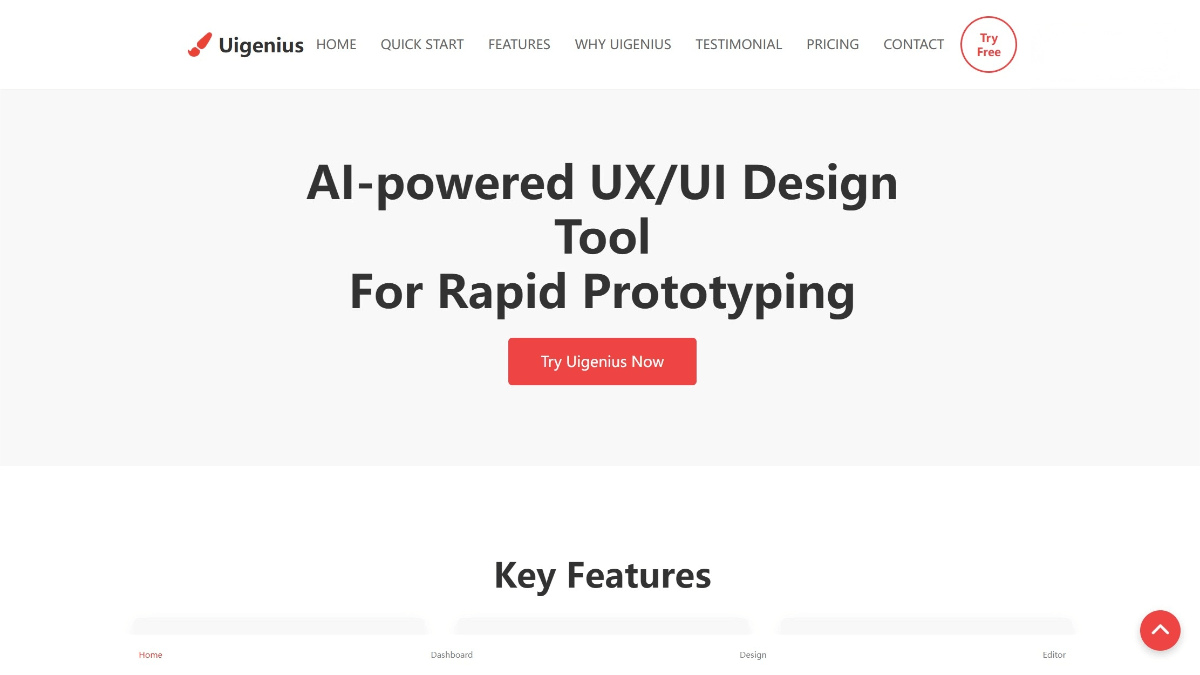
Uigenius – an AI-assisted UI/UX design tool launched by Uigenius.top
What is Uigenius?
Uigenius is an AI-assisted UI/UX design tool launched by Uigenius.top, designed for designers, product managers, and anyone who needs to create interface designs. Powered by AI, it can instantly transform text descriptions into high-fidelity prototypes, and supports one-click export of front-end code such as HTML, Vue, and React, enabling seamless collaboration between design and development. Uigenius also supports real-time collaboration, allowing team members to co-create and iterate designs efficiently.
Uigenius – Main Features
• Text-to-Design
Users only need to enter a text description, and the AI will automatically generate visually appealing and functional UI prototypes.
• Real-Time Collaboration
Supports online real-time collaboration. Multiple team members can edit and give feedback simultaneously, greatly speeding up design iterations.
• Screenshot Conversion
Upload screenshots or images, and the AI will automatically convert them into editable design components.
• Hand-Drawn Sketch Digitization
Transforms hand-drawn sketches into professional digital designs using AI.
• One-Click Code Export
Once the design is complete, users can export HTML, Vue, or React code with a single click for immediate use in front-end development.
• Multi-Platform Support
Supports designing for multiple platforms (e.g., web, mobile) and generates responsive layouts.
• Cloud Access
Cloud-based service—no installation required. Access and edit your designs anytime, anywhere.
How to Use Uigenius
-
Register & Login
Visit the Uigenius website at uigenius.top to sign up and log in.
You may also download the desktop version:
https://apps.microsoft.com/detail/9P7XBXGZN5JS -
Select a Project
Create a new project or open an existing one, and define your design goals and requirements. -
Enter a Description
Input a detailed description of the interface layout and functionality you need. -
Generate the Design
Click the generate button, and the AI will produce a high-fidelity prototype based on your description. -
Edit & Refine
Adjust and optimize the design—tweak layouts, colors, fonts, and other details. -
Team Collaboration
Invite team members to join the project for real-time collaboration and joint iteration. -
Export Code
After the design is finalized, export HTML, Vue, or React code directly for development use. -
Save & Share
Save your work and share it via link or file for others to view.
Uigenius Pricing
• Free Plan – $0/month
Includes 10 UI generation requests per month, 3 screenshot conversions, and access to free AI models.
• Pro Plan – $12/month
Includes unlimited UI generation, unlimited screenshot conversions, pro AI models, unlimited storage, and priority support.
• Lifetime Plan – $79 one-time purchase
Includes unlimited UI generation, unlimited screenshot conversions, no prompt limits, pro AI models, unlimited storage, priority support, and a dedicated account manager.
Core Advantages of Uigenius
-
Efficient Design Generation
AI instantly transforms text descriptions into high-fidelity prototypes, significantly boosting productivity. -
No Design Skills Needed
Non-designers can easily create attractive and functional interfaces, lowering the barrier to design. -
One-Click Code Export
Directly export HTML, Vue, and React code for development, reducing repetitive work. -
Real-Time Collaboration
Multiple team members can edit simultaneously, accelerating design iterations and improving team efficiency. -
Multi-Platform Support
Design for both web and mobile simultaneously, ensuring responsive layouts across devices. -
Cloud-Based Access
Use the tool anywhere without installation—ideal for distributed teams. -
Boosts Creativity
Frees designers from repetitive tasks, enabling them to focus on creativity and strategy. -
Mature and Reliable
Developed by a global expert team and trusted by tens of thousands of professional designers.
Use Cases of Uigenius
-
Product Design Team Collaboration
Quickly generate prototypes, collaborate in real time, and improve team workflow efficiency. -
Startup Rapid Development
Startups can validate ideas quickly, generate prototypes, and export code to accelerate product launch. -
Non-Designers Creating Interfaces
Product managers and developers can generate UI designs without needing professional design skills. -
Remote Team Collaboration
Ideal for distributed teams, enabling real-time cooperation regardless of location. -
Multi-Platform Product Design
Useful for designing web and mobile interfaces simultaneously while maintaining consistency. -
Design Education & Training
Great for teaching UI/UX concepts, helping students quickly practice and understand design principles.
© Copyright Notice
The copyright of the article belongs to the author. Please do not reprint without permission.
Related Posts


No comments yet...