
Spokenly – a local AI voice-to-text dictation tool with automatic grammar optimization
What is Spokenly?
Spokenly is an intelligent voice-dictation application designed for Mac and iPhone. It supports more than 100 languages with automatic language detection, making it ideal for multilingual users and global teams. With its “local-first” mode, all audio data is processed entirely on-device, ensuring strong privacy protection. Spokenly offers real-time transcription, displaying text instantly as you speak, and allows users to choose from multiple engines ranging from ultra-fast to highly accurate.It integrates AI models such as GPT-4 to automatically optimize grammar, adjust text formatting, and adapt content based on context. The Agent Mode enables users to control their Mac through voice commands with zero mouse interaction—for example, searching the web or launching applications. Spokenly also provides a complete history management system that saves all voice-input records, supporting search, playback, and export for easy review and management.
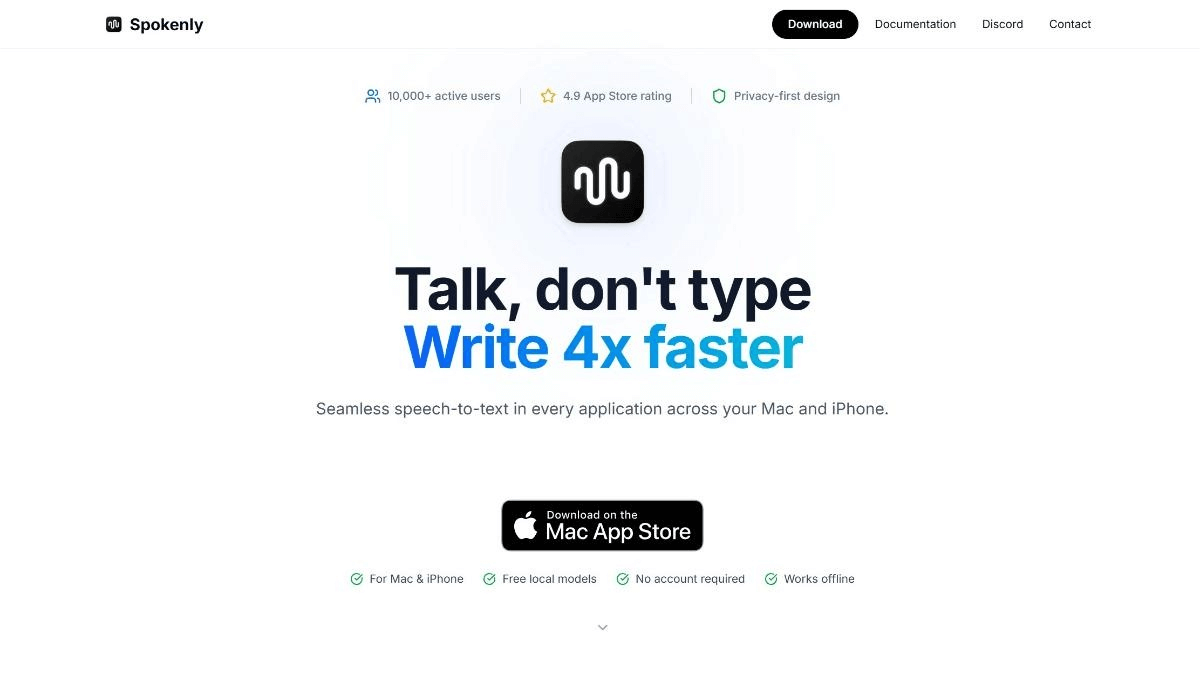
Spokenly – Key Features
Multilingual Support
Supports over 100 languages with automatic language detection, ideal for multilingual users and international teams.
Privacy Protection
Offers a local processing mode where all audio data stays on the device, ensuring high privacy and security.
Real-Time Transcription
Displays text instantly as you speak, with multiple engine options from ultra-fast speed to maximum accuracy.
AI-Powered Text Processing
Integrates models like GPT-4 to optimize grammar, adjust formatting, and adapt text to different contexts.
Agent Mode
Allows users to control their Mac through voice commands, enabling mouse-free operations such as web searches and app launching.
History Management
Stores all voice-input records with support for search, playback, and export, making it easy to revisit or manage transcription history.
Free to Use
Local models are completely free and require no account. Cloud models provide additional advanced capabilities.
Offline Mode
Fully supports offline voice-to-text usage, ensuring functionality even without internet access.
How to Use Spokenly
1. Visit the Platform
Go to the official website: spokenly.app.
2. Install & Set Up
Download and install the Spokenly app on your Mac or iPhone. On first launch, follow the prompts to select your language and preferred settings.
3. Choose a Mode
Select “Local Mode” for maximum privacy or “Cloud Mode” for enhanced recognition and advanced features.
4. Start Dictating
Open the app where you want to input text (Notes, Mail, Documents, etc.). Choose the input source in Spokenly and start speaking; the text will appear instantly in the target app.
5. Use Agent Mode
Control your Mac using voice commands, such as “search the web” or “open an app,” enabling hands-free operation.
6. Manage History
In the Spokenly app, view, search, or export your previous transcription records for later review or editing.
7. Optimize Text
Use AI features to refine transcription results—correct grammar, adjust formatting, or expand content as needed.
8. Switch Languages
In multilingual contexts, you can switch languages at any time; Spokenly will automatically detect and adjust the recognition language.
Application Scenarios for Spokenly
Quick Note-Taking
Capture key points and ideas during meetings, classes, or moments of inspiration without typing.
Document Writing
Use voice to draft long-form articles, reports, or emails to boost writing efficiency.
Programming Assistance
Developers can dictate code comments or quickly log development ideas, reducing manual typing.
Multilingual Communication
Transcribe multilingual conversations in international team meetings or cross-language communication settings.
Accessibility Support
Helps users with disabilities or those who prefer voice interaction to operate the computer more easily.
Content Creation
Bloggers, writers, and video creators can quickly generate scripts or copywriting through voice dictation.
© Copyright Notice
The copyright of the article belongs to the author. Please do not reprint without permission.
Related Posts


No comments yet...